
3rd Year Computational Chemistry Lab
Part A: Ammonia
Introduction
Although the ammonia molecule (NH3) is a small and very simple molecule, it is also very interesting. In the first part of this lab you are going to carry out some calculations on NH3.Ammonia is a colorless gas under standard conditions, with a sharp, acrid odor. Under 1 atm, it boils at -33.4¡C and because it can be liquefied at room temperature it often used as a coolant. Ammonia is also highly soluble in water, and under standard conditions, a saturated solution is about 30% ammonia. The solution is a powerful cleaning agent, and a little added to your window-cleaning solution not only cleans but also helps prevents streaking. Nitrogen is an essential element for plant growth, but plants cannot use elemental nitrogen directly from the atmosphere, N2. Nitrogen is often added to fertilizers as ammonia ("anhydrous ammonia"), or as ammonium compounds, soil bacteria then convert it to nitrite, NO2-, which is then oxidized to nitrate and absorbed by the plants. Many salts are formed with the ammonium ion NH4+. Smelling salts is ammonium carbonate, (NH4)2CO3, which decomposes readily into ammonia (which provides the strong smell), water and carbon dioxide. Ammonium ions when combined with aromatic organic cations form a new class of liquids called "ionic liquids" because they are made of ions but unlike NaCl, which melts at about 800¼C, these substances remain liquid at temperatures under 100¼C.
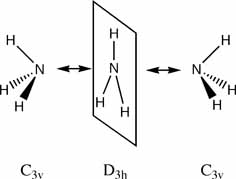 The low potential barrier between the two structures of ammonia, means that the H atoms can tunnel from one side of the nitrogen atom to the other, if all the H atoms tunnel in this way the molecule is been inverted. This purely quantum phenomenon causes "inversion doubling" of the vibrational modes of ammonia. The ammonia MASER uses these levels to achieve (coherent) laser like light in the microwave region. Another use of these purely quantum mechanical levels is in quantum computing. The ammonium molecule can thus be used as a "qubit" (a quantum information unit). If we say the state on the left of the diagram above is the "left" state, and the state on the right of the diagram above is the "right" state. Then the ammonia molecule flips between these two states many times a second. However a linear combination of these two states forms a "stationary state" (a state that does not change over time, and hence the word stationary!). The two physical states form "+" and "-" stationary states (which are eigenvectors of the system Hamiltonian). A quantum computer will force a change from one state to the other (by applying "light" of the right resonant frequency). This is equivalent to the 0 and 1 of ordinary electron based computing.
Activities
- symmetry
- basis set and method
- inversion barrier
- vibrational spectrum
- MO diagrams
(A1) optimise the ground state for NH3. Start with a 6-31G basis set and the HF method (be sure to save at least one checkpoint file as you will need it in the next step, if you don't know how to use checkpoint files ask the demonstrator.)
- generate an NH3 molecule in gaussview and optimise it (save your output file)
- determine the symmetry of your molecule by reading the output .log file
- what is the symmetry of your molecule? It should be C3v
- generate another NH3 molecule in gaussview and make one bond longer than the others by setting it to 1.01�, and under the general tab, tick ignore symmetry and then run the optimisation
- what is the symmetry of your molecule? It should be C1
- use the file provided and run another optimisation (nh3_highsym.txt)
- what is the symmetry of your molecule? It should be D3h
Look over the three optimisation jobs and consider the following questions:
- has the symmetry made any difference to the final structure obtained?
hint(1) -> look at the output file where is says
"Optimization completed.
-- Stationary point found." - has the symmetry made any difference to the optimisation process?
hint(2) -> look at the output file where it says
"Job cpu time:" - can a molecule "break symmetry" during an optimisation?
- what implications does this have if you enter a high symmetry structure to optimise?
- what implication does symmetry have for the time it takes to do a calculation?
- what is the energy of each structure? (be sure to identify the units)
- what is the energy difference ΔE=E(D3h)-E(C3v)? (report the energy difference in atomic units, and kJ/mol) Is this difference significant?
- what is the energy difference ΔE=E(C3v)-E(C1)? (report the energy difference in atomic units, and kJ/mol). Is this difference significant?
(A2) Optimise the ground state (the C3v structure) and the inversion transition state (the D3h structure) for NH3 at a higher level. Start a new set of calculations using the results (ie the checkpoint files) from your "low level" calculations (if you don't know how to do this ask a demonstrator, you need to copy the checkpoint file to a new name and then read in a guess from the newly named checkpoint file). Use a 6-311G(d,p) basis set and the B3LYP method. NH3 is a small molecule and the calculations do not take a lot of time, however when you start doing much larger calculations these "preparation" or lower level jobs are very important for saving time and processing (which costs money!) These calculations will take slightly more time than the earlier ones (but will still take only a few minutes).
- optimise the ground state for NH3 under C3v symmetry
- optimise the inversion transition state for NH3 under D3h symmetry.
- how long do these calculations take compared to your lower level ones?
- determine the barrier height to inversion by finding the relative energy at this level of calculation ΔE=E(D3h)-E(C3v)
- has ΔE changed much between the HF/3-21G and B3LYP/6-311G(d,p) sets of calculations?
- how do your results compare to the experimentally determined barrier which is 24.3 kJ/mol?
(A3) If you are using Gaussview (a graphical interface to Gaussian) you will not be able to actually carry out this calculation because Gaussview is primarily for beginners, and it cannot generate input files required for some of the more sophisticated options available in Gaussian.
However, the computers in the computer room are capable of being booted into Linux, so please do this now.
boot into linux
- use control-alt-del to exit windows
- choose shutdown
- choose restart
- wait ...
- type linux (and press the return key) in answer to the question that appears on the screen
- press return on the next screeen
- wait ...
- enter your college username and password to login
starting a browser
- click on the redhat (lower left OR upper left of screen)
- choose internet
- choose firefox
- type www.ch.ic.ac.uk/hunt into the header
- navigate to this point
using a terminal
- click on the redhat (lower left OR upper left of screen)
- choose system tools
- choose terminal
- click on the terminal screen to "activate" it
download the following input file nh3_scan_com.txt, change the name to nh3_scan.com.
If you can't find the file another option is to copy and paste the contents of the file explicitly.
- use the mouse to highlight all of the text and copy it
- in the terminal application type "vi nh3_scan.com" at the promt (vi is a command line based text editior)
- then press i (to put editor into insert mode)
- paste using the mouse
- after the last line in the file ensure there is a blank line by pressing return a couple of times (otherwise gaussian will fail with an error)
- press the escape key (to put the editor into command mode)
- type ":wq" (this stands for write and quit)
- then continue ...
Execute the file from the terminal by typing "nohup g03 nh3_scan &" (and press the return key), you should see something like:
[1] 18621

$ sending output to nohup.out
press the return key again to get the prompt back
you can see if your job is running by typing "ps -u your_user_name"
the output of this job will be sent to a file called nh3_scan.log. The job will take perhaps 10 minutes to run. You can use the tail command to see if it is finished "tail nh3_scan.log", you will know it is done when you see:
					Job cpu time:  0 days  0 hours  3 minutes 20.8 seconds.
					 File lengths (MBytes):  RWF=     11 Int=      0 D2E=      0 Chk=      7 Scr=      1
					 Normal termination of Gaussian 03 at Mon Jan 29 12:40:09 2007.
you can also watch the file interactively getting longer using "tail -f nh3_scan.log" however to get out of this you must type "control-c"
this is what the output file should look like nh3_scan_log.txt The important bit is near the end of the file and looks like this:
Summary of Optimized Potential Surface Scan
                         1         2         3         4         5
     EIGENVALUES--    -56.56750 -56.56765 -56.56806 -56.56874 -56.56962
	   R1            .99867    .99867    .99929   1.00002   1.00102
	   A1          90.00000  88.00000  86.00000  84.00000  82.00000
	   T1         120.00000 120.00000 120.00000 120.00000 120.00000
The energies are the important part for plotting the potential energy surface, and the values under A1 are those that change over the "scan".
Once the job is complete reboot into windows and look at the output file using Gaussview, a "movie" selection should come up, the green button on the left-hand side, run the "movie" of the scan process. If you are having problems you could use the log file given above.
- use the input file provided and explain what each of the sections means, and answer the following questions:
- what is the z-matrix format?
- what is happening in this scan?
- how could this file be changed to reduce the symmetry to C1?
- which coordinate is the "reaction coordinate"?
- plot the energy change versus reaction coordinate (note that energy is never reported directly, but with respect to a "reference calculation" carried out with exactly the same method and basis set, in this case use the energy of your C3v optimised structure as your reference.
- should the plot be symmetrical or unsymmetrical?
(A4) Carry out a frequency analysis for the optimised B3LYP/6-311G(d,p) C3v and D3h structures. To do this first copy the checkpoint file from your good C3v calculation to say nh3_c3v_freq.chk, and then open it in Gaussview. Choose the frequency analysis option (under job type) instead of an optimisation (do not do the Raman). Repeat this process for the D3h structure.
- how many positive frequencies are there for the C3v and the D3h structures?
- draw the vibrational modes and label the symmetry of each for both structures (visualise them with gaussview)
- compare the calculated frequencies for the C3v structure to those obtained experimentally (you will have to look them up). The C3v structure is the ground state structure, ground state structures always have all positive frequencies. The D3h structure is a transition state structure, transition states always have only one negative frequency
- which vibration "follows" the inversion reaction path?
(A5) The molecular orbitals. Using your notes and the material avaliable on this web-site from the "MOs in Inorganic Chemistry" particularly Lecture 4's tutorial problem:
- draw a MO diagram for D3h NH3 in chemdraw
- save images of the orbitals drawn in gaussian and paste them onto a copy of this MO diagram replacing the cartoon MOs with the real ones.
- draw a MO diagram for C3v NH3
- draw the correlation diagram showing how the orbitals change as the bond angle changes from 90¼ in the D3h structure to Å112¼ in the ground state structure.
- Using MO theory explain why NH3 is more stable in the C3v geometry?
- prepare two slides in your presentation where you talk about these diagrams
Well done, this is the end of Part A